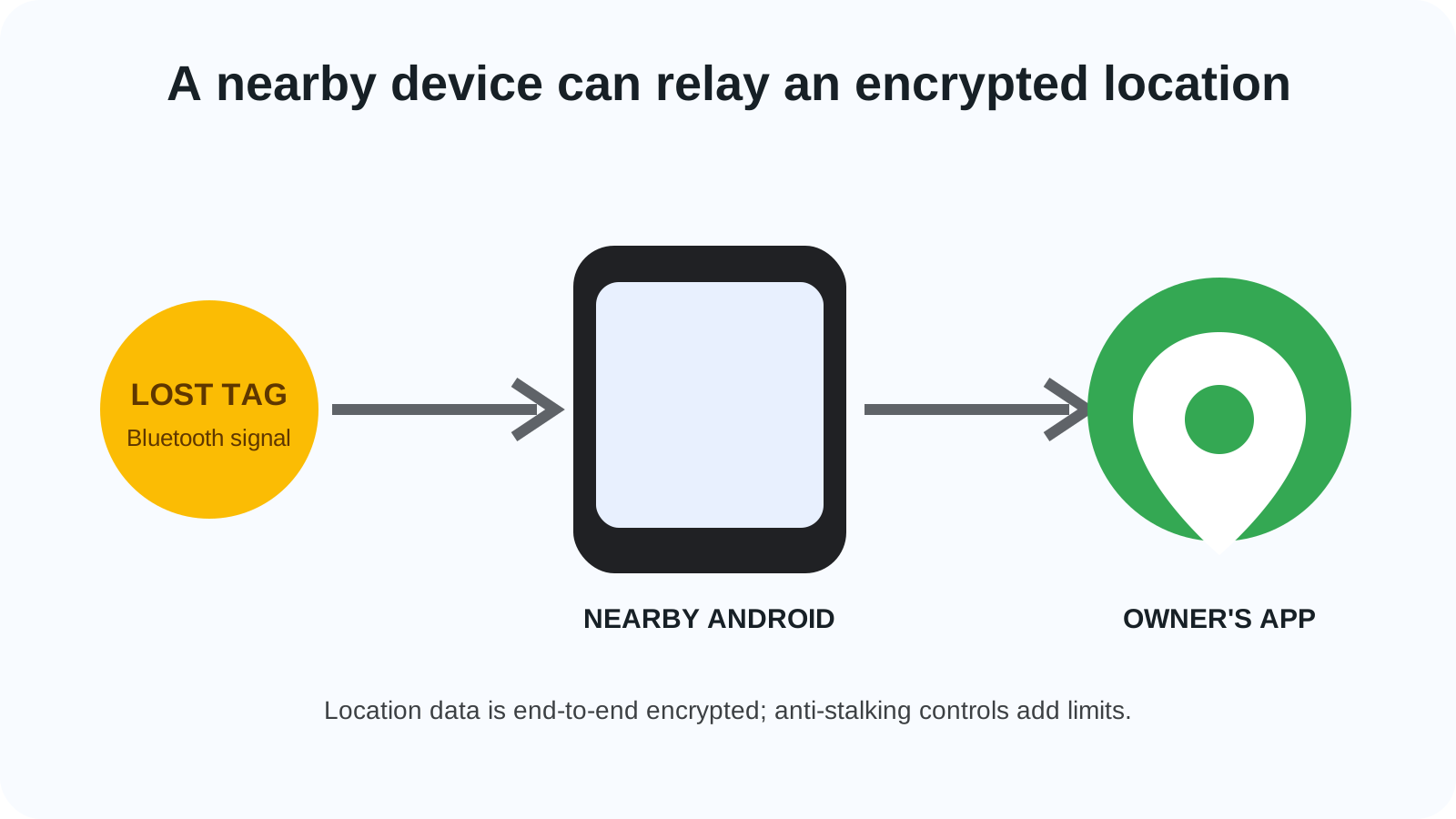
An offline Find My Device search fails when the phone, the tag, or the owner’s settings sit outside the conditions on the saved Google pages. The April 8, 2024 network works by having a nearby participating Android phone report an encrypted location.
The Find My Device network locates a compatible offline phone or tag when a nearby participating Android phone sends an encrypted location the owner can open. Erik Kay’s post shows the date line Apr 08, 2024, and says the rollout starts in the U.S. and Canada on a crowdsourced network of over a billion Android devices. That post names offline finding for compatible phones and tablets, and powered-off finding for Pixel 8 and 8 Pro through specialized Pixel hardware. The record is in the Android history hub under Industry Insights. The security post publish line is April 8, 2024, and the copy saved October 18, 2026 calls this network Find Hub. Android Help, fetched the same day, prints the Find Hub offline settings and prints no article date.
| Input or item | Value the saved page prints | Why it matters |
|---|---|---|
| Kay date line | Apr 08, 2024 | Schema datePublished is 2024-04-08. Schema dateModified is 2024-04-10 |
| Rollout start | U.S. and Canada | The sentence says around the world, starting in those two |
| Scale phrase | over a billion Android devices | Kay’s phrase. Phones beside one lost item: blank |
| Offline items | Compatible Android phone and tablet | The post says even when they are offline |
| Powered off | Pixel 8 and 8 Pro | Specialized Pixel hardware. Duration: blank |
| May tags | Chipolo and Pebblebee | Starting in May. Built for this network |
| Later tag brands | eufy, Jio, Motorola | The word more is uncounted |
| App version, April 8 | Android 9+ | Kay’s closing sentence |
| Help settings | Off; Without network; busy places only; everywhere | Fetched October 18, 2026. Article date: blank |
| Android 8.0 or lower | Stays out of the broader crowdsourced network | Recent-location storage is a separate help sentence |
| Lock screen | PIN, pattern, or password | Required to take advantage of the network |
| Detection distance | Unprinted | |
| Accuracy | Unprinted | |
| Country names | Spec says certain countries and supported countries | |
| Age number | Spec says age-eligible | |
| Powered-off duration | Unprinted |
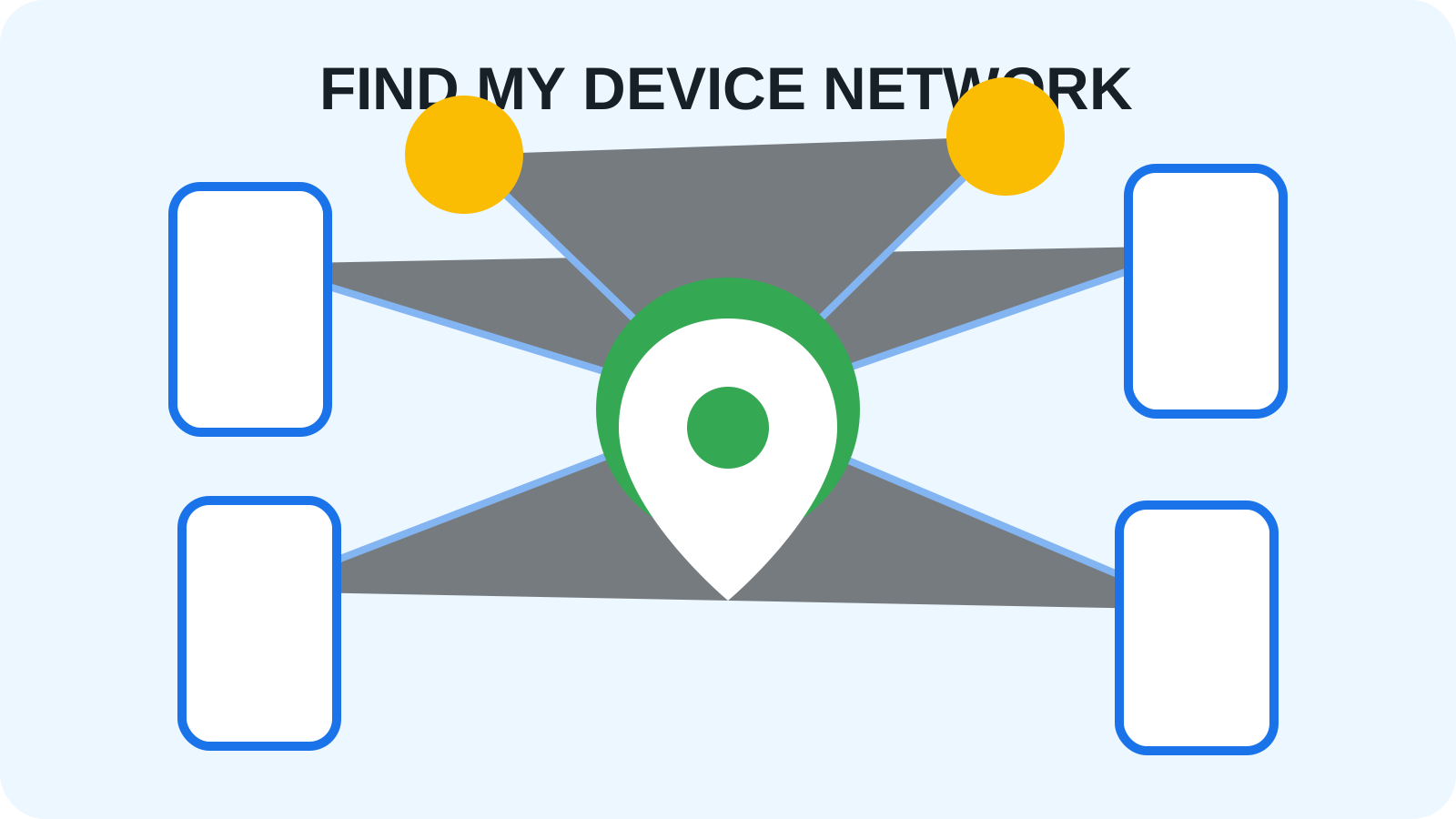
Open the cover diagram at full size.
What changed on April 8, 2024?
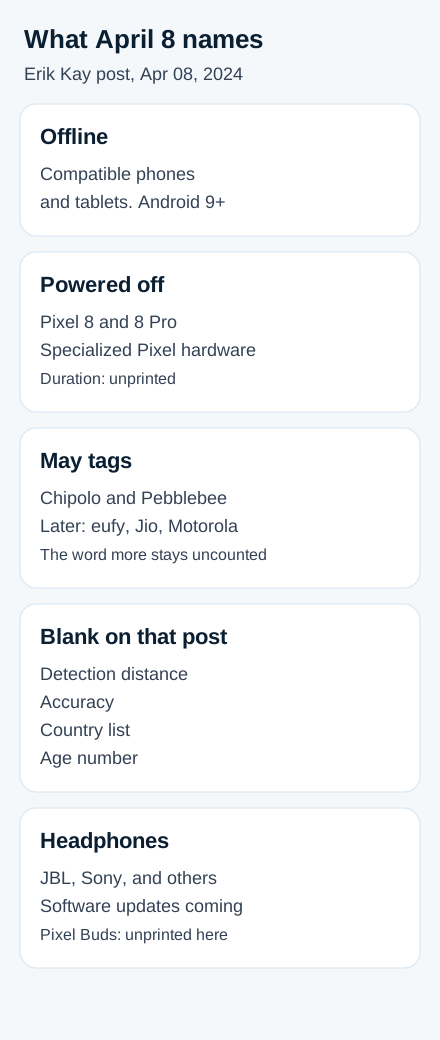
On April 8, 2024, Erik Kay’s post said the all-new Find My Device was rolling out around the world, starting in the U.S. and Canada. Compatible phones and tablets can be rung or viewed on a map even when offline. Pixel 8 and 8 Pro add specialized Pixel hardware for finding those phones when they are powered off or the battery is dead. A duration is unprinted.
The May 10, 2023 post, also by Kay, says the older service located devices that had location capabilities and were connected to the internet. It scheduled a refresh for later that summer, using over a billion Android devices for offline devices, headphones, tracker tags, or a phone via Bluetooth proximity. The April 8 post is the “Today” line. The earlier online service on this site is Android Device Manager and the start of Google’s lost-phone tools.
From that April 8 post, Chipolo and Pebblebee tags start the following month, built for this network, for keys, a wallet, or luggage, with unknown tracker alerts on Android and iOS. Later that year the names are eufy, Jio, Motorola, and more. A Find nearby button appears when the owner is close. The app shows proximity to home Nest devices. Share examples are a house key, a TV remote, and luggage. The closing line is Android 9+, plus software updates for headphones from JBL, Sony, and others.
Schema datePublished is 2024-04-08T16:00:00+00:00. Schema dateModified is 2024-04-10T14:35:42.814761+00:00. The 2023 post names Tile, Chipolo, and Pebblebee, plus Pixel Buds, Sony, and JBL. Tile and Pixel Buds are unprinted in the April 8 accessory sentences. Both schema dates on the 2023 post are 2023-05-10.
How can another phone find an offline item?
A participating Android phone detects the lost item over Bluetooth and sends the location where it made that detection. The owner then opens an encrypted report.
Dave Kleidermacher’s security post uses a cafe example. The keys have no location capabilities. Nearby participating phones report a Bluetooth tag on those keys, and the owner logs in to see the aggregated location. The publish line is April 8, 2024. The byline is Dave Kleidermacher, VP Engineering, Android Security and Privacy.
Android Help, fetched October 18, 2026, says participating phones scan with Bluetooth and send the detection location. The owner receives that location and approximately when the item was last seen. Google cannot identify you when your phone shares a detection. The key opens with the device PIN, pattern, or password, using the same technology as Google Password Manager.
The accessory spec, last updated 2026-08-20 UTC, defines end-to-end encryption for beaconing Bluetooth Low Energy devices as a Fast Pair extension. The summary says Find My Device Network (FMDN). The next paragraph says Find Hub Network (FHN), version v1.3. Rotation should happen every 1024 seconds on average, with the Fast Pair ad, the FHN ad, and the BLE address rotating together. The recommended add-on is 1 to 204 seconds.
What could the network locate at launch?
The April 8 post’s locate list is the table above: offline phones and tablets, Pixel 8 and 8 Pro when powered off or the battery is dead, Chipolo and Pebblebee the following month, eufy, Jio, and Motorola later, and JBL and Sony headphones after software updates. Find nearby, Nest proximity, and accessory sharing are in that same post. Duration, detection distance, and a full model list are unprinted there.
The security post’s aggregation paragraph says the network is most valuable in cafes and airports. In less busy areas it points to last known location and Nest finding. That sentence sits apart from the at-home paragraph.
The April 8 post leaves a Google Pixel Tag unnamed. A later page on this site is the Pixel Tag compatibility guide.
How was location data protected?
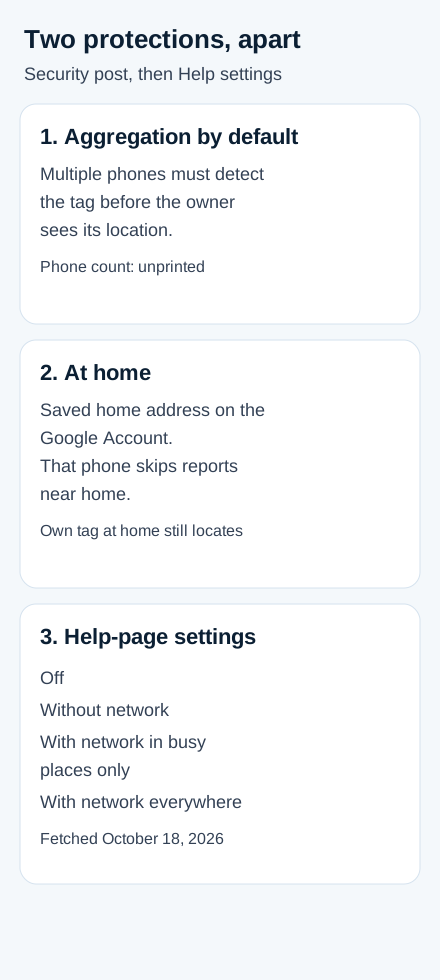
Location reports are end-to-end encrypted, and the security post splits that claim from two further protections that do different jobs.
Kay’s April 8 post says location data is end-to-end encrypted, and it names aggregated device location reporting as extra protection against unwanted tracking back to a home or private location. Kleidermacher’s post, same publish line, saved October 18, 2026, is the page that separates the layers. The key for a tag’s location is accessible to the tag owner and to anyone the owner has shared the tag with in the Find Hub app. Google cannot decrypt, see, or otherwise use that location data. The reports are contributed so that Google cannot identify the owners of the nearby Android devices that provided the locations. When the owner sees a location and a timestamp, the report includes nothing else about those nearby phones.
Aggregation by default requires multiple nearby Android devices to detect a tag before the owner sees its location. The number inside “multiple” is unprinted. The post calls this a first-of-its-kind protection and ties it to busy public places and to over a billion Android devices that can participate.
At-home protection is an additional layer on top of that default. If the user has saved a home address in the Google Account, that person’s Android device does not contribute crowdsourced location reports when it is near that home. The same paragraph says that when your phone is near your own tag, even at home, you can locate it.
Rate limiting is a third control in that post, and the numeric cap is unprinted. A nearby phone can file only a limited number of reports for one tag, and the owner can request updates only so often. The examples are keys on a cafe table and checked baggage.
Android Help, fetched October 18, 2026, prints four labels under Find your offline devices. Off stops offline finding and stored recent locations, while online locate, secure, and erase remain. Find Hub itself turns off under Settings, Google, All services if tabs exist, Personal and device safety, Find Hub, with Allow device to be located off. Without network stores only the latest encrypted location for the phone and connected Fast Pair accessories such as earbuds. Tags and the broader network are out. With network in busy places only waits for multiple phones, with airports and busy footpaths as the examples, and it requires a lock screen before your own item gets that help. With network everywhere lets one detecting phone share a location. The saved line ties that setting to a quicker find.
A PIN, pattern, or password is required to take advantage of the network. Until then the phone still helps others and stores recent locations. With a lock screen, that key opens with the PIN, pattern, or password. Without one, it opens with the Google Account password. Android 8.0 or lower stays out of the broader network and can still store recent locations under Store recent location. Link sharing keeps the location encrypted and adds a key for anyone who opens the link while signed in to a Google Account.
How did Android address unwanted tracking?
The May 10, 2023 post schedules unknown tracker alerts for later that summer: a notification if the phone determines an unknown tracker is moving with you, plus a map, a sound, disable instructions, and a manual scan. It names Apple AirTags and Find My Device compatible trackers, and says Google had helped publish a draft cross-platform specification the previous week. The April 8 post says the Chipolo and Pebblebee tags work with those alerts on Android and iOS.
Kleidermacher’s saved post says the network follows the integration version of that joint standard. Android and iOS users get an alert when the on-device algorithm detects unwanted tracking with a compatible tag. The saved sentence’s verb there is “may.”
The help page fetched October 18, 2026 limits the feature to Android 6 and up. An alert means someone else’s tracker is separated from its owner and far from that owner’s phone. The tips cover a borrowed item and a travel companion. Playing a sound leaves the owner unnotified. Airplane mode, Bluetooth off, or location off on your phone leaves the owner’s find path in place. Disable steps follow the manufacturer.
The disable table names Apple Airtag, Chipolo CARD, Chipolo ONE, Motorola moto tag, Pebblebee Card, Pebblebee Clip, and Pebblebee Tag. Find nearby is limited to Find Hub network compatible trackers, and the shape fills as you get closer. A distance is unprinted. Pause runs up to 24 hours on those trackers. Alerts are deleted after 48 hours. The page allows one alert per tracker each day. A manual scan takes about 10 seconds. Android 11 and up can scan with Location off. Android 10 and lower uses Location and Bluetooth. Automated alerts need Location on. The travel record stays on the phone, encrypted, and the page keeps it from Google and other users. If you feel unsafe, go to a safe public location and contact law enforcement or a trusted contact. Named resources are WESNET Safety Net Australia, Refuge UK, and the Safety Net Project in the United States. Later app location permissions are separate: Android 17 precise location controls.
The spec requires certified FHN devices to meet the implementation version of Detecting Unwanted Location Trackers. A sound maker is mandatory, at a minimum 60 Phon peak as defined by ISO 532-1:2017, with a recommended ring of 12 seconds. In unwanted tracking protection mode, one sentence fixes the FHN advertisement’s BLE address while the Fast Pair non-discoverable address keeps rotating. Another reduces MAC private address rotation to once per 24 hours while the ephemeral identifier keeps rotating. Both sentences are on the saved spec.
What could stop offline finding from working?
Offline finding stops when a saved page’s gate is closed. The dominant failure mode stays with the page that prints the prevention.
| Gate | Dominant failure mode | Prevention the saved page prints |
|---|---|---|
| Off | Offline finding is off | Turn it on under Find your offline devices. Online locate, secure, and erase remain |
| Without network | Tags and the broader network are out | Store a recent location, or switch to a With network setting |
| No PIN, pattern, or password | Your own crowdsourced finds wait | Set a lock screen. The phone still helps other people |
| Android version below 9 | The broader network is closed | Android 8.0 or lower stores recent locations only. April 8 and the spec print Android 9+ |
| Busy-places aggregation | One nearby phone is too few | The everywhere setting allows a single detector. The count in “multiple” is unprinted |
| Bluetooth, location, or connection | The spec compatibility line fails | Location and Bluetooth on, plus cell service or internet |
| Factory reset | The tag stops beaconing | Wipe the ephemeral identity key and the account keys |
| Powered off, outside Pixel 8 and 8 Pro | April 8 names only those two | Duration unprinted |
| Region or age | Certain countries, age-eligible users | Names and the age number are unprinted |
Rule of thumb: If the version number is below 9, use the help page’s Android 8.0 or lower sentence. That phone stays out of the broader crowdsourced Find Hub network. The April 8, 2024 post and the accessory spec both print Android 9+.
Worked example, arithmetic on the printed lines. May names = 2 brands (Chipolo and Pebblebee). Later names = 3 brands (eufy, Jio, and Motorola). May names + later names = 5 brands. 2023 tag names = 3 brands (Tile, Chipolo, and Pebblebee). Disable rows = 7 rows on the help page fetched October 18, 2026. Day gap = 334 days, from April 8, 2024 minus May 10, 2023. 1024 + 1 = 1025 seconds. 1024 + 204 = 1228 seconds. High end = 1228 seconds. A measured find time is unprinted.
The security post also says Find Hub can secure or erase a lost device. Theft-detection lock on a later Android release is a separate record: Android 15 Private Space and Theft Detection Lock.
Why does the Find My Device network still matter today?
The help page fetched October 18, 2026 still documents crowdsourced offline finding, under the name Find Hub, with the four settings above. The accessory spec’s footer says last updated 2026-08-20 UTC, and its compatibility paragraph still requires location services, Bluetooth, cell service or an internet connection, Android 9+, certain countries, and age-eligible users. The April 8, 2024 launch post still uses the name Find My Device. The security post’s saved copy uses Find Hub for the same publish line.
Kay’s April 8 wording adds a location for a compatible phone or tablet even when that device is offline, plus tags that have no location of their own. The spec changelog puts v1.1 in Feb 2023, v1.2 in Apr 2023, and v1.3 in Dec 2023. The v1 date cell is blank. Its comment is “Initial release of the FHN spec for early access.”
Further reading
- Android Device Manager and the start of Google’s lost-phone tools covers the earlier online locate, ring, and erase service.
- Android 15 Private Space and Theft Detection Lock is the later theft-detection record, separate from Find Hub’s secure and erase actions.
- Android 17 precise location controls is the later app-permission record, separate from on-device unknown-tracker alerts.
- The Pixel Tag compatibility guide is the later accessory page. The April 8, 2024 post leaves that tag unnamed.
How this page was checked
Six pages saved on October 18, 2026 support the sentences above: Kay’s April 8, 2024 post, Kay’s May 10, 2023 post, Kleidermacher’s security post, both Android Help articles, and the accessory spec. A blank cell is an unprinted figure. May names = 2 brands, Later names = 3 brands, 2023 tag names = 3 brands, Disable rows = 7 rows, Day gap = 334 days, and High end = 1228 seconds are arithmetic on printed lines. Kay’s schema dateModified is 2024-04-10. The security body uses Find Hub. The help pages print no article date.