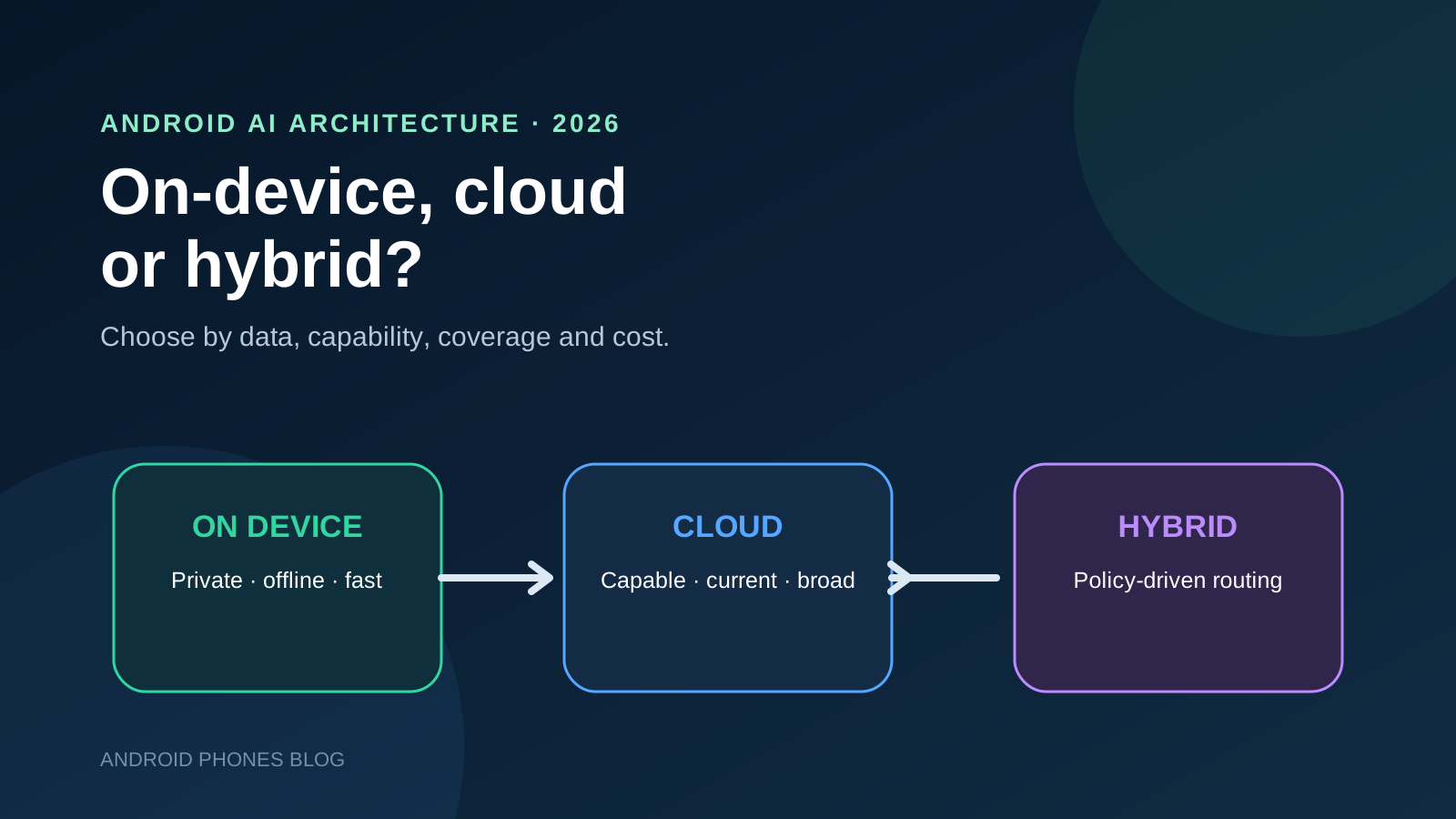
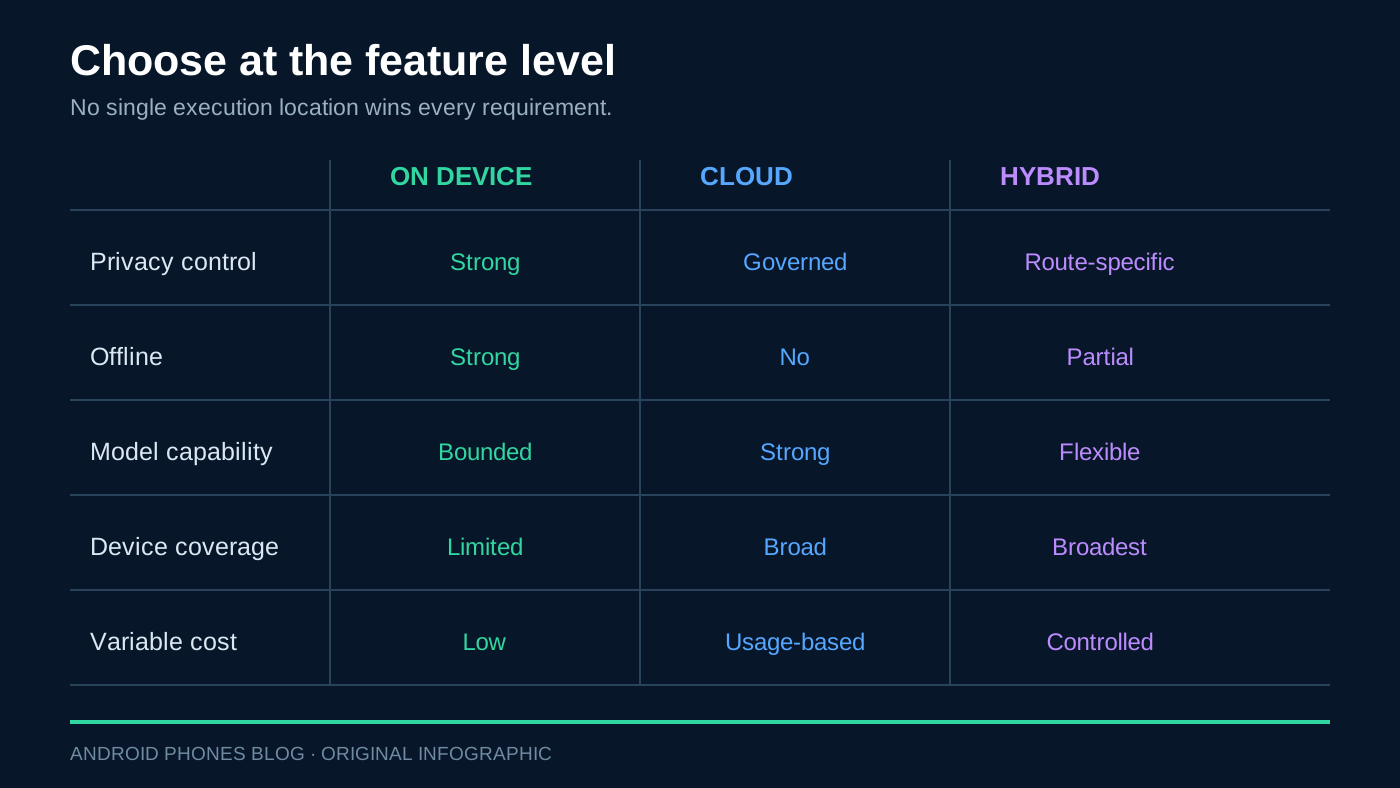
Use on-device AI when privacy, offline operation, low interaction latency and predictable per-request cost dominate. Use cloud AI when the task needs a larger model, long context, current knowledge or broad device coverage. Choose hybrid only when both routes are permitted and useful, and the team can test their transitions. A cloud fallback can violate a local-only data promise.
On-device, cloud and hybrid AI at a glance
| Route | Choose it when | Boundary to verify |
|---|---|---|
| On-device | Local model meets the task and offline/data rules | Model ready on each supported device |
| Cloud | Larger models or external information are needed | Approved data transfer and connectivity |
| Hybrid | Both routes are useful and permitted | Explicit routing and separate quality tests |
| No AI / manual recovery | Neither permitted route meets the task | Preserve a usable non-AI workflow |
ONLY_ON_DEVICE means no cloud processing for that request, including retries. If the local path cannot run, return an unavailable state or a manual workflow.
API and model status checked October 8, 2026
| Component | Documented version / stage | Support boundary |
|---|---|---|
| ML Kit Prompt API | Current setup: genai-prompt:1.0.0-beta4; beta, without SLA/deprecation guarantees |
Use the Prompt-specific device list and runtime readiness check |
| Nano 4 July example | 1.0.0-beta3, ModelReleaseStage.PREVIEW, with AICore preview opt-in |
A preview example does not establish general model availability |
| Current Prompt device list | nano-v4: Pixel 11, 11 Pro, 11 Pro XL and 11 Pro Fold; Galaxy Z Flip8, Z Fold8 and Z Fold8 Ultra | nano-v3 includes selected Pixel 9/10 models and Galaxy S26, S26+ and S26 Ultra; use the exact list below |
| Firebase Android hybrid | Experimental; setup uses firebase-ai:18.0.0 and firebase-ai-ondevice:16.0.0-beta06 |
Local path uses the beta Prompt API on supported devices |
Sources: current Prompt setup, beta terms, July preview example, model/device list and Firebase Android setup. These are documentation versions, not a claim that this site tested those SDKs. Check the selected model on the actual device.
When is on-device AI the right choice?
On-device inference is strongest when the request contains information that should not leave the phone and the task can be completed by the local model. Examples include rephrasing a private draft, extracting fields from a locally stored note, generating a short reply, classifying content or assisting where connectivity is unreliable.
The user experience can also feel immediate because a request avoids a network round trip. Google highlights privacy, offline functionality, low latency and the absence of cloud inference charges as key benefits of Gemini Nano through ML Kit. Those benefits are meaningful, but each needs a qualification.
First, availability is not universal. An app must check whether the required model and feature are supported, ready or need preparation. Never place a local-AI button in the interface and assume every Android device can complete the same request.
Second, local execution still consumes resources. Large prompts, repeated generation and sustained inference can affect memory, battery and thermal behavior. Measure the full interaction on representative low-, middle- and high-end supported devices—not only a flagship developer phone.
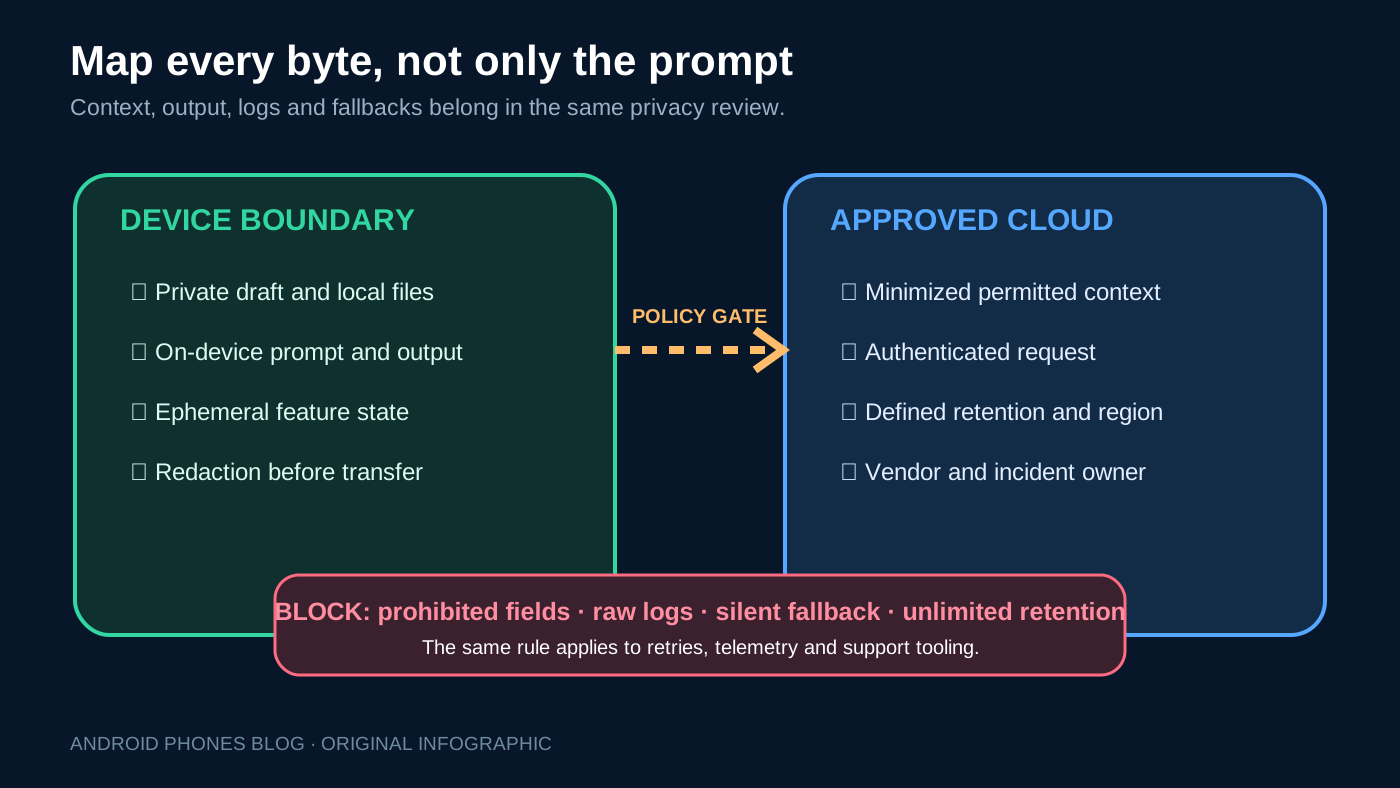
For the full privacy boundary, include the logs and fallback paths described in the data-policy section below.
Our Pixel 10 Tensor G5 on-device AI guide examines the hardware side of local inference. This guide focuses on the application architecture that must work across a mixed Android install base.
When should an Android app use cloud AI?
Cloud inference earns its place when task quality depends on capabilities that a compact local model or a specific phone cannot reliably supply. That includes longer context, complex reasoning, high-output workloads, server-side tools, shared enterprise knowledge and answers grounded in current information.
Cloud execution can also simplify consistency. A product team can route supported users to the same centrally managed model and update system instructions, safety controls or retrieval sources without waiting for a device model rollout. It serves phones that lack the required on-device model, provided they have suitable connectivity.
The tradeoffs are material. Prompts and context cross a network boundary. The feature acquires authentication, abuse prevention, quota, regional availability, retention and vendor-governance requirements. Latency becomes sensitive to connectivity and server load. Cost scales with request volume, prompt size, output length and model choice.
For Firebase AI Logic, Google recommends protections such as App Check with Play Integrity to reduce unauthorized access to backend resources. That is one control, not a complete threat model. Teams should also define rate limits, user entitlements, data minimization, retention rules and incident ownership.
Cloud AI should therefore be chosen because the feature needs it—not because a prototype was easiest to wire to a remote endpoint.
When is hybrid inference useful?
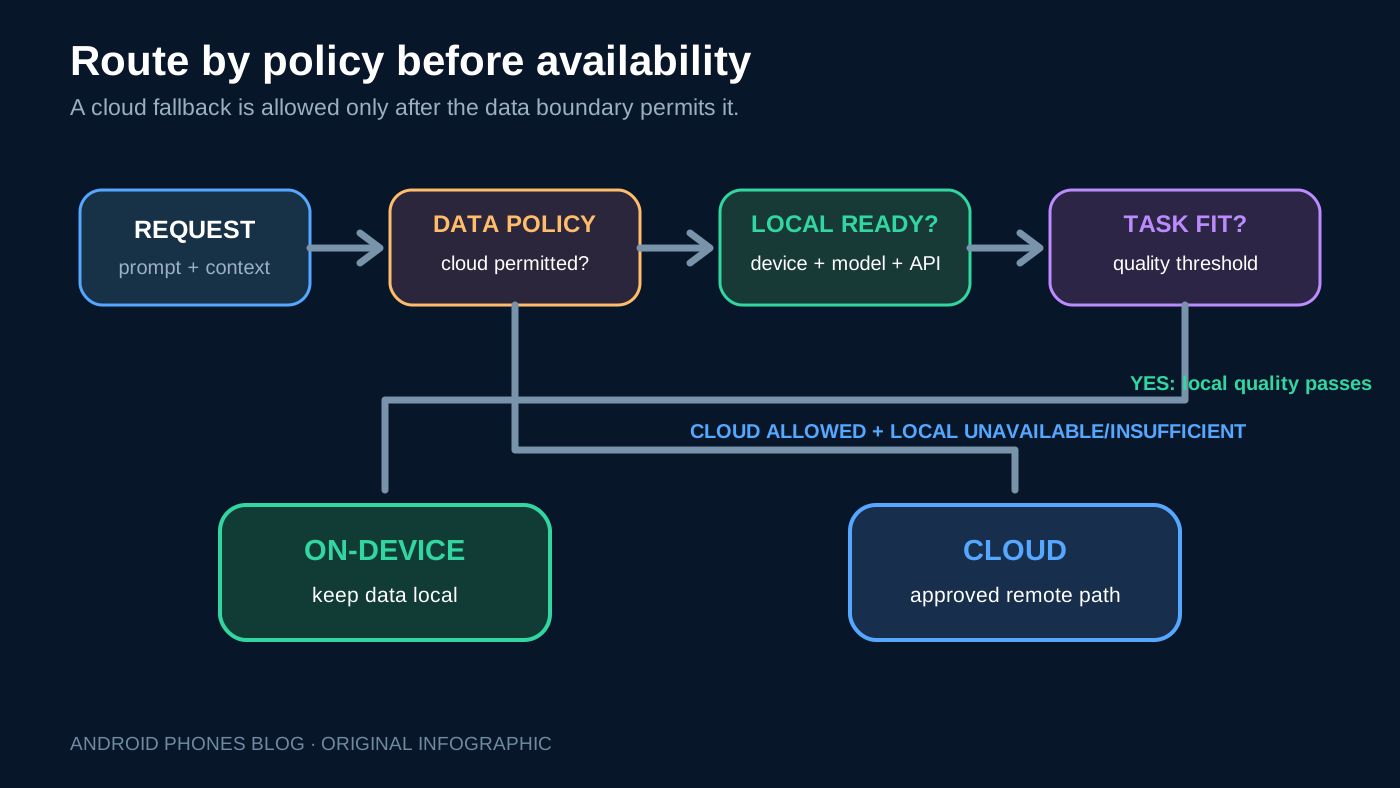
Hybrid inference treats execution location as a runtime decision. A short private transformation may run locally; a request needing fresh web information may go to the cloud. If a compatible on-device model is unavailable, a permitted cloud path can preserve the feature for more users.
Firebase AI Logic documents four useful policy shapes:
PREFER_ON_DEVICE: prefer local execution, with SDK-defined fallback when local execution is unavailable; this does not measure output quality.PREFER_IN_CLOUD: prefer cloud execution, with SDK-defined fallback when the cloud path is unavailable.ONLY_ON_DEVICE: do not send the request to the cloud.ONLY_IN_CLOUD: require the centrally hosted path.
Match the mode to the data-policy gate above; a preference allows fallback, while an only-mode constrains execution location.
How should privacy and consent change the route?
Classify the data before choosing a model. A useful design review separates public input, ordinary account data, confidential work content, highly sensitive personal data and data that policy forbids from leaving the device.
For every class, record whether it can be sent to a processor, which fields must be removed, where inference may occur, how long records are retained and whether a user must opt in. Apply the rule to attachments, retrieved context and generated output—not only the text typed into a prompt box.
If execution can switch locations, the interface should explain the meaningful difference. A compact status such as “Processed on this device” or “Uses cloud AI” can establish the boundary without forcing users to understand model architecture. A setting that disables cloud fallback is valuable only if the feature respects it in background retries and error recovery.
How do latency, quality and offline behavior interact?
Do not reduce the choice to a single benchmark. Users experience time to first visible response, total completion time, interruptions, retries and whether the result is useful enough to avoid a second attempt.
An on-device model can start quickly with no network, yet take longer to complete a demanding request on constrained hardware. A cloud model can stream an early answer over a strong connection, yet fail in a warehouse, airplane or congested event venue. A lower-quality local result that forces the user to rewrite everything has poor effective latency.
Build a test grid around real operating conditions:
| Test dimension | Minimum cases |
|---|---|
| Device | Oldest supported, median active, current flagship |
| Connectivity | Offline, weak/variable, normal Wi-Fi, low-latency cellular |
| Input | Short, typical, long, multimodal where supported |
| Thermal state | Cool start and repeated-use warm state |
| Language | Highest-volume languages and difficult edge cases |
| Outcome | Time to first token, completion, task success, retry, cancellation |
Define a quality floor for the local path. If it falls below that threshold, either ask permission for cloud processing, offer a non-AI workflow or explain that the task cannot be completed offline. Hiding a materially weaker answer behind the same label erodes trust.
What costs should the architecture review include?
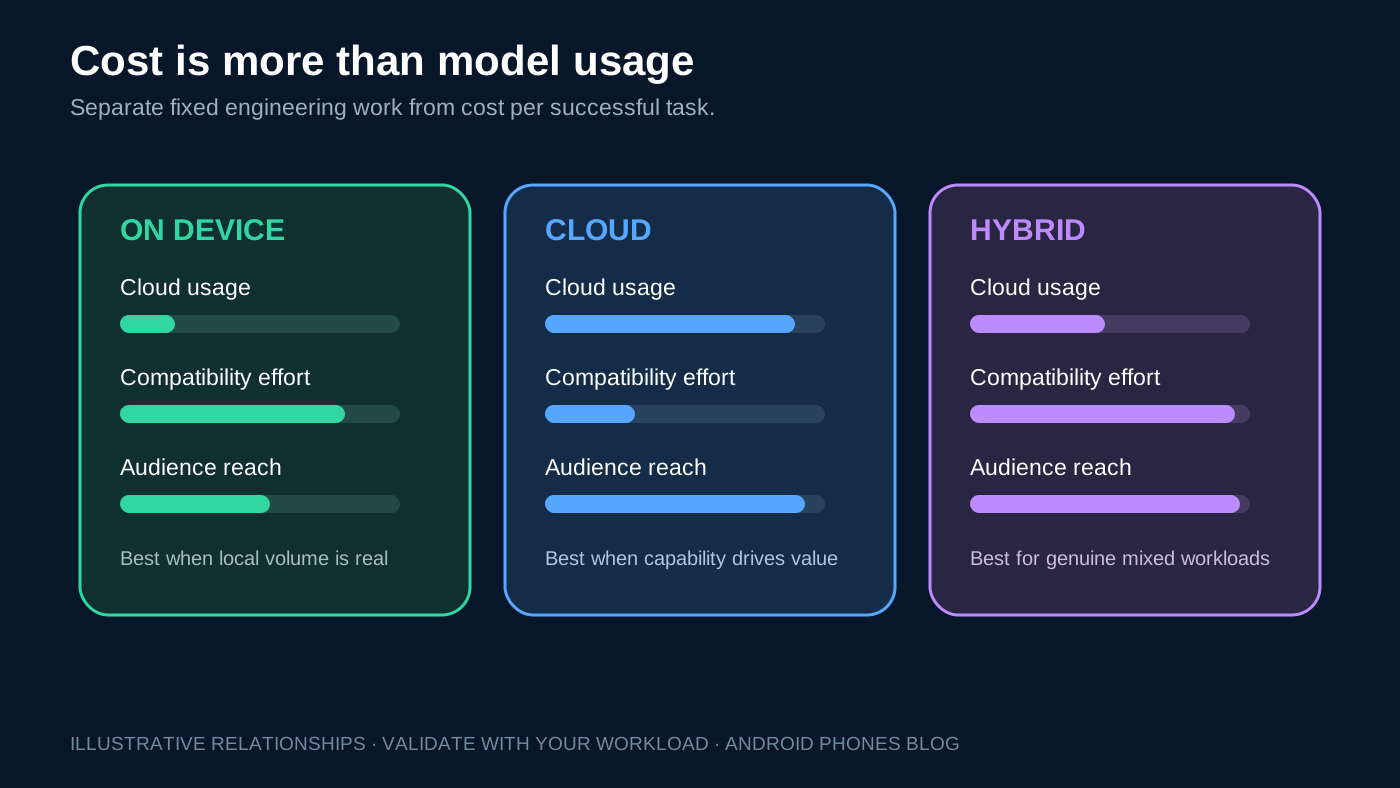
On-device inference removes the cloud model charge for a locally completed request, but not the total cost of the feature. The team still owns compatibility checks, dual-path tests, device support, model preparation, analytics, customer support and release validation.
Cloud costs are easier to see because they arrive as usage. Estimate them with production-shaped prompt and output lengths, cache assumptions, retry rates and abuse scenarios. Add observability, gateway, retrieval, storage and incident-response costs where relevant.
Hybrid can reduce variable spend by moving suitable volume to devices, while increasing fixed engineering and QA effort. It is most attractive when local execution handles a large, stable class of requests—not when an elaborate router saves only a small number of cloud calls.
Fill in a feature-level decision path
This is an editorial planning tool, not a benchmark or a numerical ranking. Complete the gates in order; an unresolved hard constraint stops the decision.
| Gate | Your answer | Output |
|---|---|---|
| May this input leave the device? | Yes / No / Unresolved | No: eliminate cloud and cloud fallback; unresolved: stop |
| Must the feature work offline? | Yes / No | Yes: require a ready local model or manual recovery |
| Does local output meet your quality and language requirements? | Pass / Fail / Untested | Fail with no cloud permission: use manual recovery; untested: validate first |
| Is an approved cloud path needed and available? | Yes / No | Yes: choose cloud for those eligible requests |
| Are both routes useful, tested and allowed? | Yes / No | Yes: hybrid is a candidate; otherwise use the permitted single route |
Example — assumed inputs: a private-note rewriting feature forbids data egress and must work offline. Assume the selected local model passes the team’s language and quality checks. The output is local-only; on an unsupported or unprepared device, offer manual editing. Choosing PREFER_ON_DEVICE would not satisfy the assumed no-cloud rule. No measured performance is implied.
How should teams implement and roll out hybrid AI?
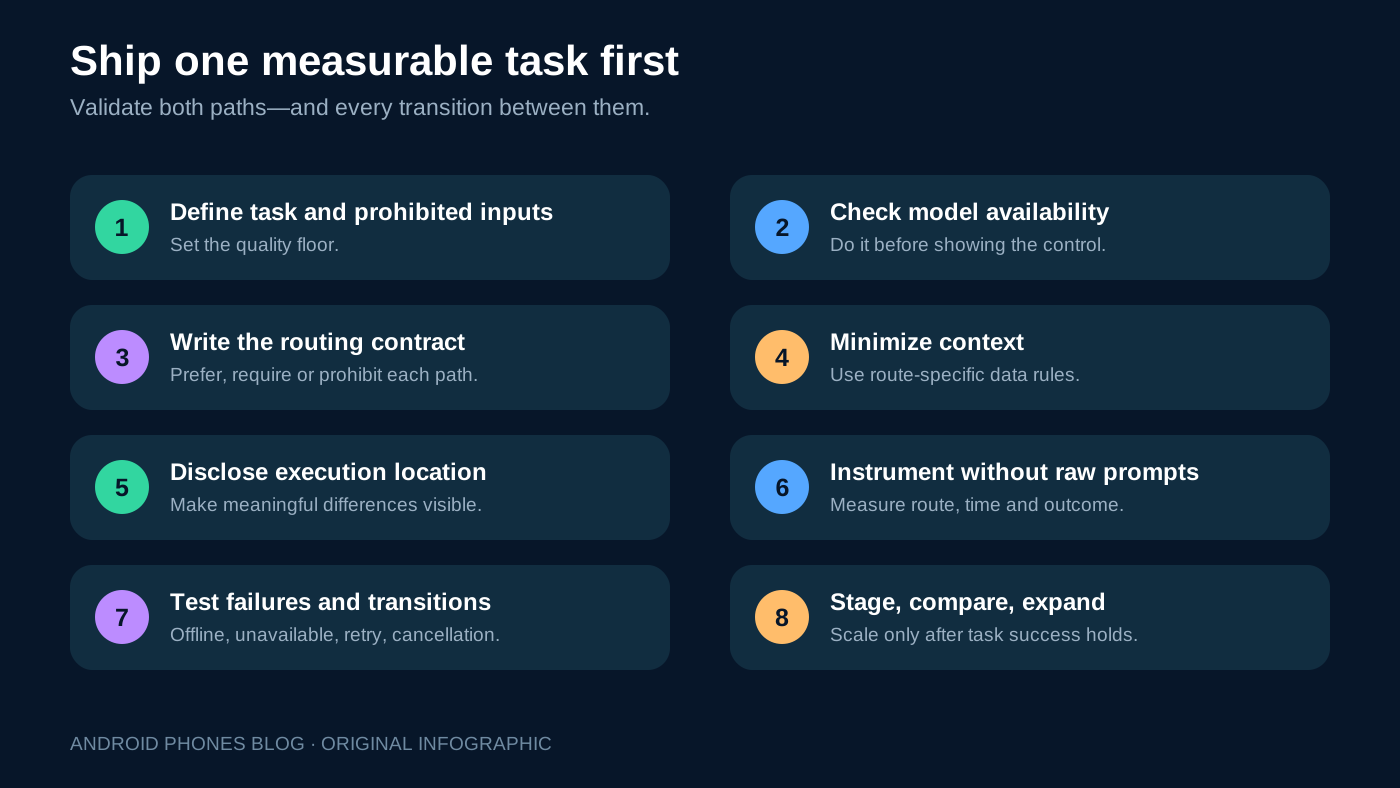
Start with a narrow, measurable task. Build an explicit execution contract before adding a router.
- Define the task, prohibited inputs and minimum acceptable output.
- Check device/model availability before presenting the local path.
- Select the routing mode and write the fallback rule in product language.
- Minimize context independently for local and cloud requests.
- Show the execution location when it affects privacy, cost or capability.
- Instrument route, latency, completion, quality proxy, cancellation and fallback reason without logging sensitive prompt content.
- Test both paths and every transition between them.
- Release to a small cohort, compare task success and cost, then expand.
Keep non-AI recovery available. Users need a manual search, standard form, saved draft or retry option when neither model path works. The Android 17 fleet upgrade guide provides a compatible staged-release model for testing OS and device differences before broad rollout.
What should teams monitor after launch?
Separate metrics by execution route, device class, app version and network condition. A blended average can hide the exact segment receiving slow or low-quality responses.
Monitor availability rate, local preparation failures, cloud fallback frequency, time to first response, completion time, task-success proxy, user correction, retry, cancellation and cost per successful task. Add privacy and safety signals such as policy-block frequency, unexpected data egress and vendor incidents.
Review route drift. A hybrid feature can gradually become cloud-only if local compatibility deteriorates, or silently lower quality if more requests are forced onto a small local model. Set thresholds that trigger investigation.
For agentic features that act across apps, execution location is only one control. Our Android Halo AI agent visibility guide explains the separate need for visible actions, confirmation and user control.
Final recommendation
Default to on-device for bounded, privacy-sensitive, offline-friendly transformations that a supported local model can complete well. Default to cloud for capability-intensive or current-knowledge tasks with an approved data path. Choose hybrid when both workload classes are real and the product team is prepared to own routing, disclosure, observability and two complete test surfaces.
The durable architecture is not the one with the most AI options. It is the one whose execution rules a product manager can explain, a privacy reviewer can verify, an engineer can test and a user can understand when the network or device changes.