Raising a virtual RAM number reserves storage or compressed memory. It does not install more RAM. Leave the control on, at the smallest size your phone offers, only when apps reload as you switch away and you still have free storage. If storage is already tight and apps stay open, turn it off and restart.
This page is one of our Android product guides. It covers the memory-extension switch that Samsung calls RAM Plus and Xiaomi calls memory extension, and the zRAM behavior described in current Android source. It does not cover a lab speed test. For a one-change battery record, use the battery drain and performance guide.
- Apps reload every time you leave them, and storage is not almost full: try the smallest virtual RAM size, restart, and compare one day.
- The memory screen already shows free RAM, or storage is under the vendor’s free-space rule: turn the reservation off.
- The phone is a Pixel, or the menu has no RAM Plus row: stop looking for this switch and change one app’s background limit instead.
What does the gigabyte setting change?
The number in the menu is the vendor’s label for reserved swap, not a second set of memory chips. Read it next to the mechanism, and treat empty cells as unpublished.
| Question | Physical RAM | zRAM (compressed, still in RAM) | Storage-backed virtual RAM |
|---|---|---|---|
| What it is | The DRAM installed in the phone | Inactive pages compressed and kept in RAM | Storage Samsung or Xiaomi say the feature occupies |
| What a GB figure means | The installed capacity, before the system and apps use it | AOSP’s memory daemon defaults a zRAM device to 50% of RAM when that setup is enabled. That default is not a user slider. | Samsung’s US Device Care page says RAM Plus can use storage to give up to 8GB of virtual memory. The Xiaomi 14 page lists Off, 4GB, 6GB and 8GB. |
| Cost named by the source | None from swapping | CPU to compress and decompress. Android’s August 19, 2026 post says this can cause interface stutter. AOSP says recompression itself does not write flash. | Storage space, plus a restart. Xiaomi’s 14T page requires 10% of storage free before the option can be enabled. |
| Battery figure | Not a virtual-RAM setting | No milliamp-hour figure in the pages cited here. Maintenance is scheduled when the phone is idle and the battery is not low. | Samsung’s Device Care page does not publish one. |
| What we measured | Nothing. This row is the published description. | Nothing. | Nothing. |
This is a comparison of published behavior, checked October 11, 2026. It is not a frame-rate or app-launch benchmark.
Where do inactive pages go?
Android can move unused memory in stages. The first stage is still RAM.
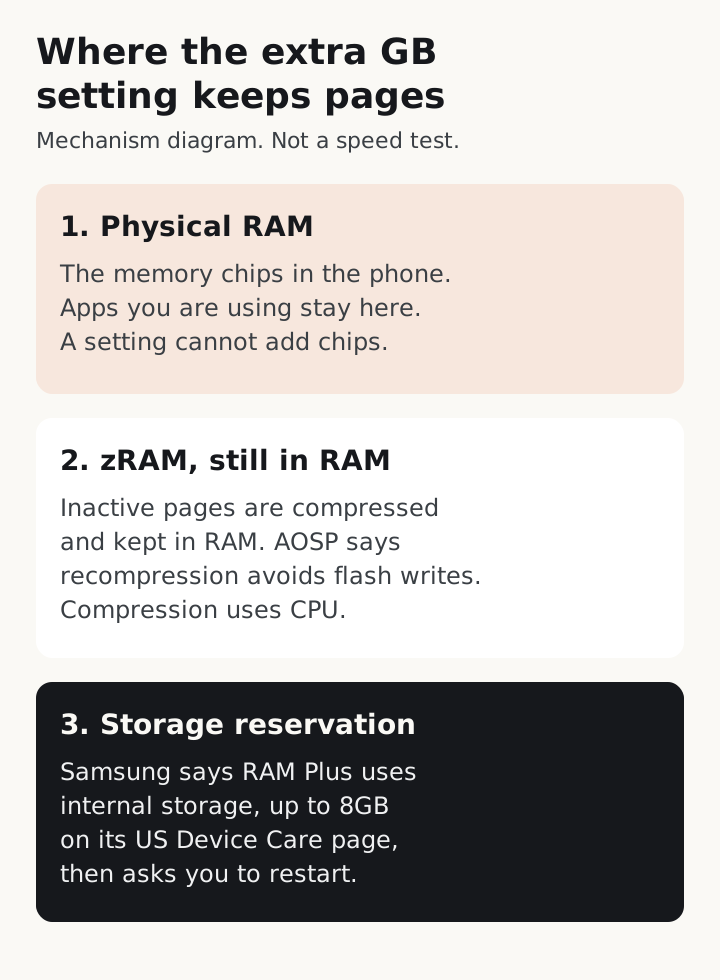
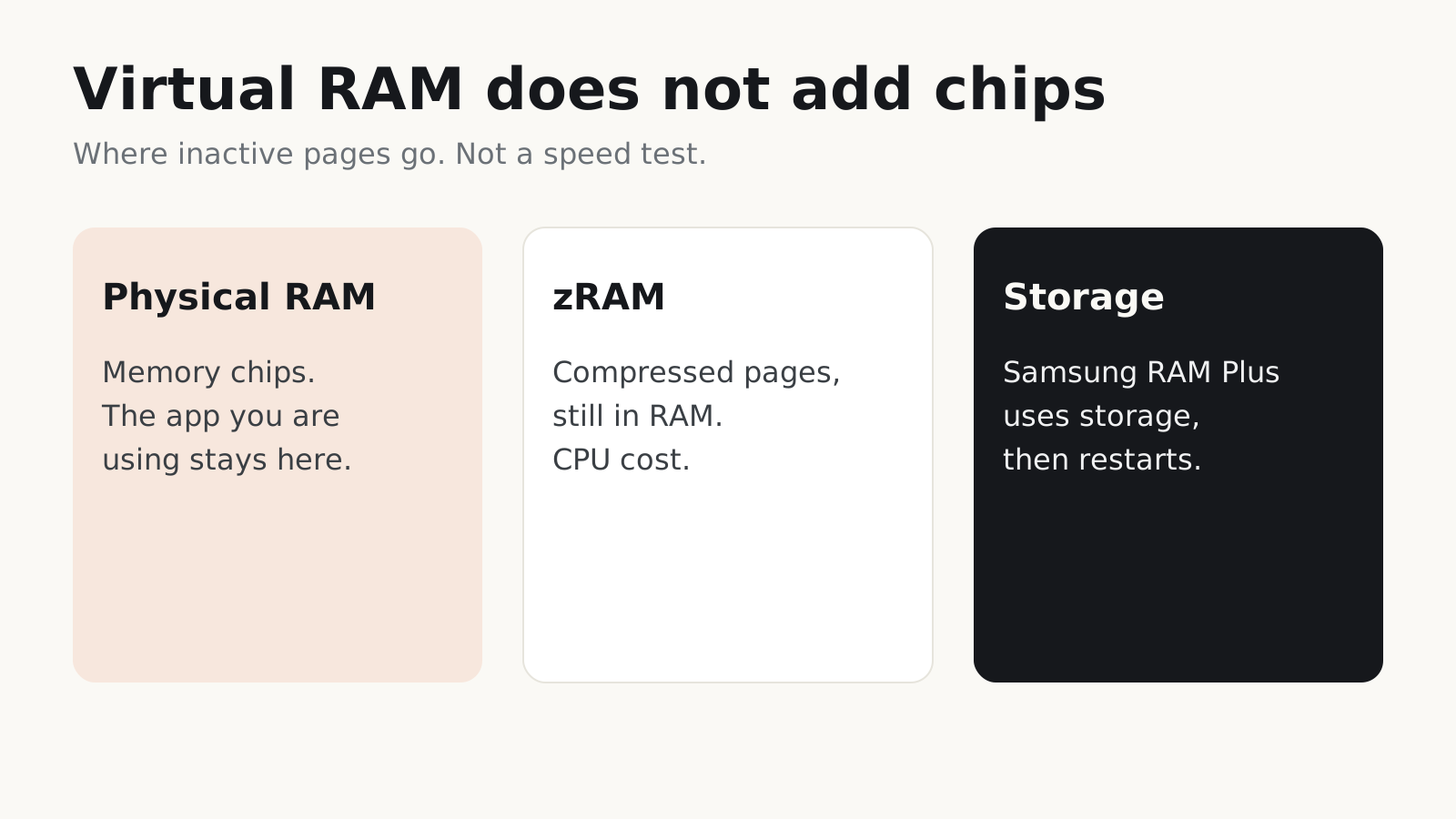
The same three stages, in text:
- Physical RAM. The chips hold the app you are using. No setting adds chips.
- zRAM. The kernel compresses inactive pages and keeps them in RAM. AOSP’s memory daemon says the first compression favors speed, and a later recompression of idle pages reclaims RAM without flash write wear. Writeback to a file on
/datais a further, optional step. Its documented default is off, and the idle age for that write is typically 20 hours or more. - A storage reservation the vendor names. Samsung’s US page says RAM Plus uses some of the phone’s storage for up to 8GB of virtual memory, and that inactive apps move there so current apps have more RAM. That is a vendor description of a storage feature, not the same sentence as AOSP’s optional writeback.
If a page you care about is only inside the diagram, use the list. The diagram is the same three stages.
What does Samsung say RAM Plus does?
Samsung’s Hong Kong support page, last updated April 28, 2026, says RAM Plus uses the phone’s storage as virtual memory so more apps can stay open in the background and launch faster. The page says the steps are Settings, Device Care, Memory, RAM Plus, choose how much storage to use, then Restart. It also says models and menus vary by where the phone was bought.
The US Device Care page, checked October 11, 2026, is more specific about the ceiling and the effect: RAM Plus uses storage to give up to 8GB of virtual memory, you pick the amount, you restart, and inactive apps move to virtual memory so the apps you are using have more RAM. It does not say that every Galaxy model offers every size, and it does not publish a before-and-after launch time.
So the decision on a Galaxy phone is local. If the switch is missing, this page cannot invent a path. If it is present, the restart is part of the change, and the storage you assign is storage you cannot use for files.
What does Xiaomi say memory extension does?
Xiaomi’s pages do not all describe the same menu.
The Xiaomi 14 storage FAQ says that phone’s RAM is 12GB LPDDR5X, that memory extension is supported, and that the choices under Settings, Additional settings, Memory extension are Off, 4.0GB, 6.0GB and 8.0GB, created by occupying storage. It also says a microSD card cannot add storage.
The Xiaomi 14T page says memory extension creates additional RAM from available storage so the phone can handle more tasks at once without slowing down. That “without slowing down” line is Xiaomi’s claim. The setup it prints is Settings, About phone, Storage, System files, Memory extension, pick a size, Reboot. A second path is Settings, Additional settings, Memory extension. Two limits are explicit: you need 10% of total storage free, and the added amount does not appear in the background task manager. The 14T page does not list 4GB, 6GB or 8GB.
An undated Xiaomi introduction says the feature is an external RAM function based on the kernel’s ZRAM, needs 10% free space, and will not change the number in the task manager. Its size chart runs from 0.5GB on a 2GB+32GB phone to 3GB on 8GB+256GB and 12GB+256GB phones. The same page’s worked example says a 256GB phone needs more than 25.6GB free. That arithmetic is 10% of storage. The sentence on the page says RAM, which does not match the 256GB figure. The Xiaomi 14 menu (Off / 4 / 6 / 8GB) also does not match that older chart. Use the choices on the phone in your hand when the pages disagree.
When should you turn it off?
Turn it off when the reservation costs storage you need and the phone is not dropping apps.
- Storage is close to full, or below the 10% line on a Xiaomi page that states that rule. Free the reservation first. A full disk makes the phone slow for reasons that have nothing to do with RAM.
- Apps you switch among already stay loaded, and the memory screen shows a large free amount. The vendor reason for the feature, keeping more background apps, is already met.
- You raised the number and a game or the camera became uneven. Put the previous value back and restart. Android’s August 19, 2026 post says forcing an app’s pages into zRAM adds CPU work and can stutter the interface, and that a process which keeps allocating past that point can be terminated.
- You wanted a faster phone in one app, not more apps parked in the background. Samsung’s description is about inactive apps moving aside. It does not say the foreground app gets a faster processor.
Leave a small size on when you are flipping among several apps and they cold-start every time, and you still have the free storage the vendor asks for. Change only that control. Restart if the phone asks. The next day, note whether those apps still reload. If they do, a larger number has not fixed a shortage the phone cannot cover, and raising it further only reserves more storage.
On the documents cited here, Pixel’s Android 17 memory work is per-app limits and zRAM inside the system, not a RAM Plus slider. If your Pixel has no such row, use the background app restriction steps and the one-change record in the battery guide.
Phones sold years ago with a gigabyte or less of RAM were a different project. Android Go was a 2017 software configuration for that class of device. Turning on RAM Plus does not turn a current phone into an Android Go phone, and it does not recreate that older memory budget.
What this page does not measure
No frame rates, app-launch milliseconds, or storage-wear totals appear above, because this site did not run that test. AOSP’s note that recompression avoids flash writes applies to that in-RAM step. It does not give a wear figure for Samsung’s storage reservation, so this page does not invent one. Brand menus change by model and region. The Hong Kong Samsung page says so directly.
If a sentence here disagrees with the setting on your phone, the phone wins. Write down the model, the Android or One UI or HyperOS version, the choices the menu actually lists, and whether apps still reload after one day.