Ultra HDR photos fail to keep a bright sky, Health Connect records stay inside one fitness app, and accessibility text clips the edge of the screen when the phone never stores the extra data. Android 14, released to supported Pixel phones on 4 October 2023, takes on those three jobs.
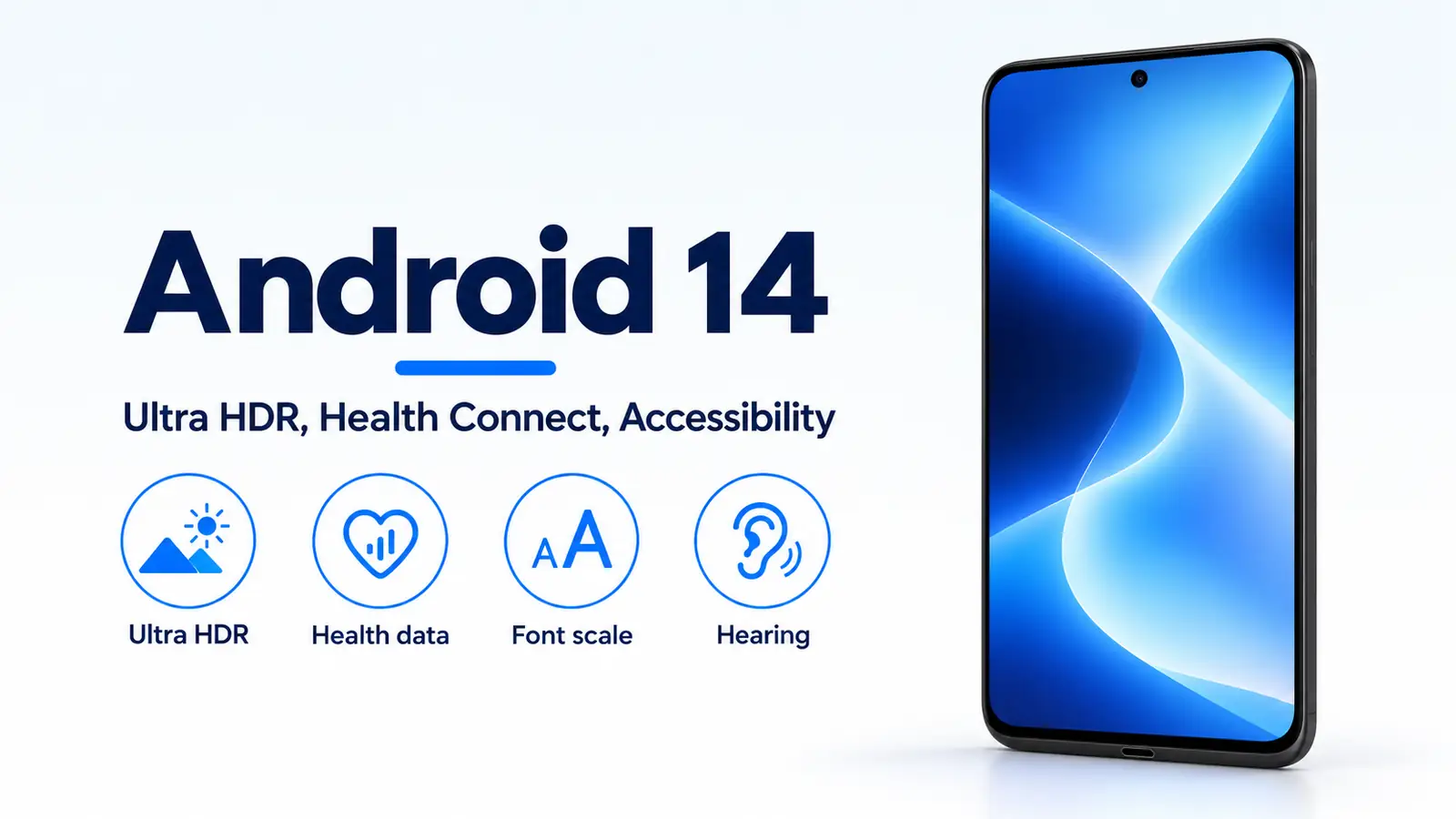
Android 14 is the 4 October 2023 release that adds Ultra HDR still photos, builds Health Connect into Settings, and lets people scale fonts to 200%. Google’s 4 October 2023 consumer post says Ultra HDR brings out brighter highlights and darker shadows, and that the photos display without altering the original image. Dave Burke’s post the same day calls the images 10-bit HDR and says the Ultra HDR format stays backward-compatible with JPEG. That post sets the font ceiling at 200% and says the previous maximum font scale on Pixel devices was 130%. The consumer post says Health Connect data is encrypted on the phone so Google or anyone else cannot see it or use it for any other purpose, and it names Oura, Peloton, and Whoop as apps you can connect. The Android history timeline places the release among the other platform years.
| Input or item | Value and source | Why it matters |
|---|---|---|
| Release day | 4 October 2023, consumer post published_time and Burke’s post |
Supported Pixels started that day |
| Ultra HDR, consumer post | Brighter highlights and darker shadows, original image unchanged | The photo still has to display on an ordinary viewer |
| Ultra HDR, Burke, 4 October 2023 | 10-bit HDR images, JPEG-compatible format | The bit depth is on this post |
| Font ceiling | 200% in Android 14; Pixel maximum was 130% before, Burke | Small text and already-large text do not grow at the same rate |
| Health Connect store | Encrypted on the phone, consumer post the same day | The post states Google cannot see the stored records |
| Health Connect delivery | Part of the platform, Play system updates, Burke; older phones use the Play app | Android 14 does not require a separate download |
| Exercise route | A list of locations in a time window, Android 14 features documentation | Sharing a route is its own permission |
| Old install target | targetSdkVersion lower than 23 cannot be installed, Burke |
The block is on the 4 October developer post |
Rule of thumb: If max display boost is at 1.0, with the format specification’s default HDRCapacityMin of 0, the decode weight is 0 and the equation returns the SDR primary. The specification says this boost value is always at least 1.0, because the display can show HDR white at least as bright as SDR white. A file that has lost its gain map has the same visible result on a brighter screen: the viewer shows the JPEG primary.
What reached phones on 4 October 2023?
Supported Pixel phones started receiving Android 14 that day. Burke’s post says select Pixel devices, and the consumer post says supported Pixel devices. Both posts name the same later group for that year: Samsung Galaxy, iQOO, Nothing, OnePlus, Oppo, Realme, Sharp, Sony, Tecno, vivo, and Xiaomi. The date is the platform and Pixel milestone. It is the day those named partners were scheduled, not a day they all updated.
The consumer post also says several large-screen features that had been planned for Android 14, including multitasking, a refined taskbar, and foldable support, had already shipped as updates to Android 13. A current large-screen page is a different document from this announcement.
Customization in the consumer post includes lock-screen shortcuts, lock-screen templates, a monochromatic theme, and generative wallpapers coming first to Pixel 8 and Pixel 8 Pro. Those are in the same post as Ultra HDR. They are not a substitute for the image format, the health store, or the font ceiling.
How does an Ultra HDR file stay a JPEG?
Burke’s 4 October 2023 sentence is the launch claim: Android 14 adds support for 10-bit HDR images, using the Ultra HDR format, and the format is fully backward-compatible with JPEG so apps can interoperate. The consumer post the same day describes the visible result as vibrant color, brighter highlights, and darker shadows, displayed without altering the original image quality.
The Ultra HDR Image Format v1.1 specification, a current format document rather than the October 4 post, defines how that compatibility is stored. A logarithmic gain map sits in a JPEG file. A reader that does not support the format reads the conventional low-dynamic-range primary image. A reader that supports the format combines the primary image with the gain map and renders a high-dynamic-range image on a compatible display. The specification stores that gain map as 8-bit unsigned integers from 0 to 255. That 8-bit figure belongs to the gain-map file in the specification. Burke’s 10-bit figure belongs to his description of the HDR images. The two sentences are about different documents.
The same specification defines a conventional SDR display as one that typically produces a nominal peak brightness of about 400 cd/m2 or less, and an HDR display as one that typically produces about 800 cd/m2 or greater. Those are the specification’s typical classes. They are not a measured peak for a Pixel phone, and they are not printed in the 4 October posts.
The Android 14 features documentation, also a current developer page, says the framework renders these images in HDR when the app opts in for its window, through a manifest entry or Window.setColorMode(). It also says the gain map can be used to render the image. That opt-in is a condition on the current features page. The October 4 posts do not print the method name.
| Path | What changes | Dominant failure mode | Prevention |
|---|---|---|---|
| Export drops the gain map | Only the JPEG primary remains | Highlights stay in the SDR rendition on every display | Keep the secondary gain-map image in the file |
| App window has no HDR opt-in | The features page withholds HDR rendering | The same file looks like the SDR primary in that app | The app opts in for the window |
| Max display boost is 1.0 | Decode weight is 0 | The adapted rendition matches the SDR primary | The display’s current boost has to rise above 1 |
| Share an exercise route | A location list leaves Health Connect | The other app receives the route you allowed | Leave individual route sharing off |
| Treat sp sizes as linear | 4sp + 20sp need not equal 24sp | Padding and text stop matching | Let the platform apply the nonlinear curve |
Where does the gain map change the picture?
The format specification computes the linear adapted HDR rendition as:
HDR(x, y) = (SDR(x, y) + offset_sdr) * exp2(log_boost(x, y) * weight_factor) - offset_hdr
offset_sdr and offset_hdr default to 0.015625, which the specification also writes as 1/64. map_gamma defaults to 1.0. The specification’s tip sets HDRCapacityMax equal to GainMapMax and HDRCapacityMin to the greater of GainMapMin or 0.
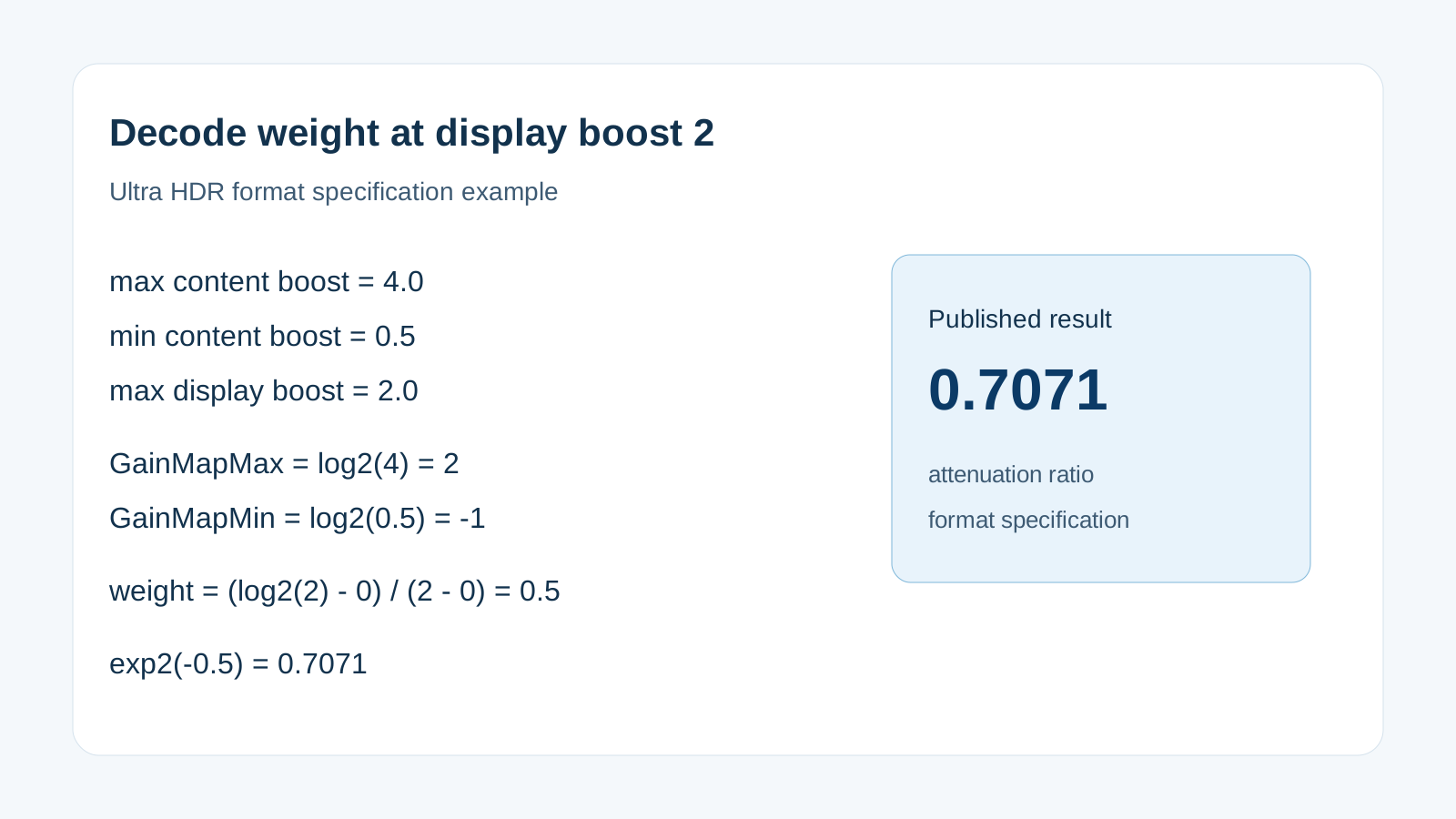
Worked example. Use the specification’s published case: max content boost 4.0, min content boost 0.5, and max display boost 2.0. Then GainMapMax = log2(4.0) = 2, and GainMapMin = log2(0.5) = -1. With the tip above, HDRCapacityMax is 2 and HDRCapacityMin is 0. For BaseRenditionIsHDR false:
weight_factor = (log2(2.0) - 0) / (2 - 0) = 0.5
On the darkest pixel, recovery is 0, so log_boost equals GainMapMin, which is -1. The exponent is -1 * 0.5 = -0.5, and exp2(-0.5) = 0.7071. The specification states that result directly: the maximum attenuation of the displayed image is 0.7071, rather than 0.5 when max display boost is 4.0 or higher. The 0.7071 figure is a luminance ratio in that example. It is not a display nit count.
When the exponent is 0, the offsets cancel and the equation returns the SDR pixel. That is the boost-at-1.0 case in the rule above. Applying the gain map by linear interpolation, the specification says, keeps relative tonal relationships only at max content boost and compromises them at other boost factors.
What does Health Connect keep on the phone?
The consumer post on 4 October 2023 says Health Connect is built into Android 14 settings as one place for the data, encrypted on the phone, so Google or anyone else cannot see it or use it for any other purpose. The apps it names are Oura, Peloton, and Whoop. It does not print a list of record types.
Burke’s post the same day calls Health Connect a user-controlled on-device repository for health and fitness data. It is part of the Android platform, it receives updates through Google Play system updates without a separate download, and on older devices it is available as an app on the Google Play store.
The Android 14 features documentation adds a feature the October 4 posts do not name: exercise routes. A route is a list of locations saved within a window of time. The user has to allow sharing of individual routes before another app receives them. That page is the features documentation, not the 4 October announcement, so the route rule stays on that page.
What new notice sits on the location prompt?
Burke’s 4 October 2023 post says the location permission dialog gains a section that highlights when an app shares location data with third parties, with a place to read more and control that app’s access. The consumer post says the same notice in plainer language: when you grant a permission such as location, Android tells you if the app is sharing location with third parties.
That notice follows the permission work in Android 13’s per-app language, notification permission, and privacy guide. Android 14 does not replace that earlier permission. It adds the third-party sharing line on the location dialog.
The same Burke post limits two other install-time behaviors. Apps with a targetSdkVersion lower than 23 cannot be installed. Full-screen intent notifications are limited, on install, to apps that provide calling and alarms. For photos, an app targeting SDK 34 that requests READ_MEDIA_IMAGES or READ_MEDIA_VIDEO can be given only selected photos and videos. Those three limits are on the 4 October developer post.
The consumer post also changes the PIN. Android 14 encourages a six-digit PIN. After the correct 6-digit or longer PIN, the phone unlocks without an extra enter press.
How does Android 14 scale text and hearing access?
Burke’s post says users can scale font to 200%. Previously, the maximum font size scale on Pixel devices was 130%. A nonlinear curve keeps text that is already large from growing at the same rate as smaller text. The consumer post describes the same curve from the reader’s side: larger font sizes enlarge more slowly than smaller ones, so text is less likely to be cut off, wrap into extra lines, or break the layout. It also adds a font-size Quick Settings tile.
The Android 14 features documentation tells developers to test at 200% and to keep text sizes in sp. It warns that nonlinear scaling means 4sp + 20sp does not have to equal 24sp, and that fontScale is informational because fonts no longer scale by one scalar. Line height belongs in sp as well, or the line stays put while the glyphs grow.
For low vision, the consumer post says the magnifier can pinch to zoom in and out from 100%. You can change the magnifier size in Magnifier Settings and choose how much of the screen is magnified. The setting “Keep on when switching apps” stops the magnifier from turning off between apps. The post does not print a maximum zoom.
For hearing, the same post describes a hearing-aid setup flow in Accessibility settings, a way to route audio to different outputs, and a shortcut to hearing-aid controls. Flash notifications, turned on from Accessibility and Notifications settings, flash a light for an incoming notification. The post does not count the hearing devices or the alerts.
Which phones were named for 4 October 2023?
The named start is supported or select Pixel devices that day. The named follow-on list, in both posts, is Samsung Galaxy, iQOO, Nothing, OnePlus, Oppo, Realme, Sharp, Sony, Tecno, vivo, and Xiaomi, later in 2023. A carrier build can trail an unlocked one. Neither post gives a per-model clock.
Feature paths split the same way. Ultra HDR still needs the file, a viewer that reads the gain map, an app window that has opted in, and a display boost above 1. Health Connect on a phone older than Android 14 is the Play app Burke describes, not the built-in Settings entry. Hearing-aid controls still need a hearing aid and the setup flow. Generative wallpapers in the consumer post start on Pixel 8 and Pixel 8 Pro.
How this page was checked
The 4 October 2023 claims come from two saved pages: the Google consumer post whose article:published_time is 2023-10-04, and Dave Burke’s “Android 14 is live in AOSP” post dated 4 October 2023. Font arithmetic, the HDR window opt-in, and exercise routes come from the Android 14 features documentation fetched with those pages. Gain-map storage, the 400 cd/m2 and 800 cd/m2 class definitions, and the 0.7071 example come from Ultra HDR Image Format v1.1. Each figure stays on the page that printed it. This page does not report a handset measurement.